
Fox 3.0.0 represents a huge leap for the app—we are now called Fox Issue & Project Organizer instead of just Issue Tracker as we expand our horizons! A huge leap, I know.
Important: There is a major data migration with 3.0.0 and above so it will be impossible to move back after migration completes. This occurs on application launch. This will also cause a full re-sync to your iCloud storage if enabled.
What’s New
- Project-Isolated Attributes — Different projects can now have different properties for their issues, including Issue Types, Statuses, Priorities, Resolutions, Tags, and Link Types. Existing projects migrate automatically.
- Redesigned Project Settings — Easily get an overview of your Project’s statistics and customize its properties.
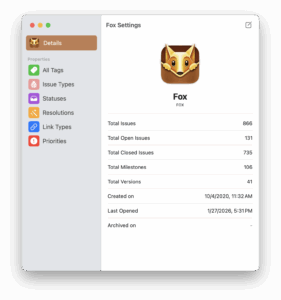
- Customizable Priorities — Priorities are now fully customizable and isolated per project, just like other attributes.
- Updated Shortcuts & CSV Import — Both now support project-isolated attributes, including open-ended priorities by name.
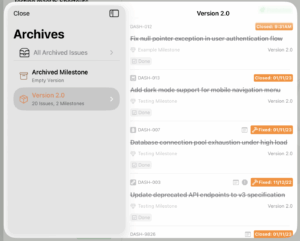
- Project Archives on iOS — Archive completed versions and milestones on iPhone and iPad.
- Navigator Customization — Add any Status or Priority from the project to the Navigator for quick access.
- Synced Settings — General settings, issue group defaults, milestone/version sort defaults, and Navigator configurations now sync across devices via iCloud.
- Independent Issue Windows on iPadOS — Issues opened outside the Workspace now appear in their own movable windows.
- Improved Issue History — Detailed tracking for property changes and assignments.
- Fox for Teams — New collaborative features including issue assignments, project sharing, and history attribution to track who made changes.
- Expanded Help Documentation — More comprehensive guides and materials.
- Free Trial Support for those wanting to give Fox Project Organizer a spin.
- Expanded Icon Set — Additional icons to choose from.
- Customizable Line Height — Reduced default line height with an option to adjust in General Settings.
- Free Trial of 14 days for users who want to give it a quick go
- Improved iCloud conflict resolution to better ensure data is merged in obvious conflict scenarios, and when merging, considers date of last edit per property.
- Under-the-hood improvements to performance and overall functionality.
Bug Fixes
- Aligned the Status menu appearance across both platforms.
- Fixed Help contents not displaying dark mode correctly on macOS.
- Fixed Help opening to the first page on iOS and the Close button occasionally being unresponsive.
- Fixed iCloud sync showing an erroneous error when the network was unavailable.
- Improved long project title visibility in the iOS Navigator.
- Improved drag and drop behavior when moving items within the iOS Navigator.
- Fixed an issue where the macOS issue detail view had extra height without corresponding content.
- Various other minor fixes and improvements.
Fox for Teams
Fox for Teams is an additional set of tools that enable the creation of collaborative workspaces and allows joining of existing Collaborative Services. Besides just collaboration, projects get:
- Access to additional tools like history attributions and issue assignment
- Access detailed history and tracking reports to oversee project trajectory
- Additional upcoming team management features.
Fox 3.0.1 Patch Release
After Fox 3.0.0 releases, it will be followed by a patch release which includes:
Search Improvements
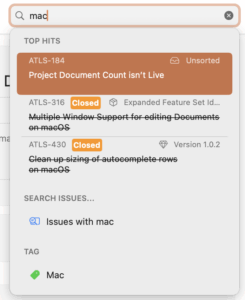
- macOS search now has feature parity with iOS, including token-based search and proper ranking support.
- Added support for searching by Status (Mac + iOS)
Bug Fixes and Improvements
- The command bar now toggles visibility when dragging issues (Mac + iOS)
- Added a plus button to the Navigator (macOS)
- Active bookmark is now highlighted (macOS)
- Redesigned the toolbar when creating an issue (iOS)
- Fixed an issue that could cause a loop with iCloud syncing (Mac + iOS)
- Added regional support to date outputs (Mac + iOS)
- Fixed image insertion at the end of a document body (Mac + iOS)
- Fixed a potential issue where the text editing menu could appear over the link editor popover (iOS)
- Fixed keyboard overlapping the bottom of the search issue view (iOS)
- Fixed color inconsistencies across several UIs (Mac + iOS)