The Big Picture: Redesigned Workspace
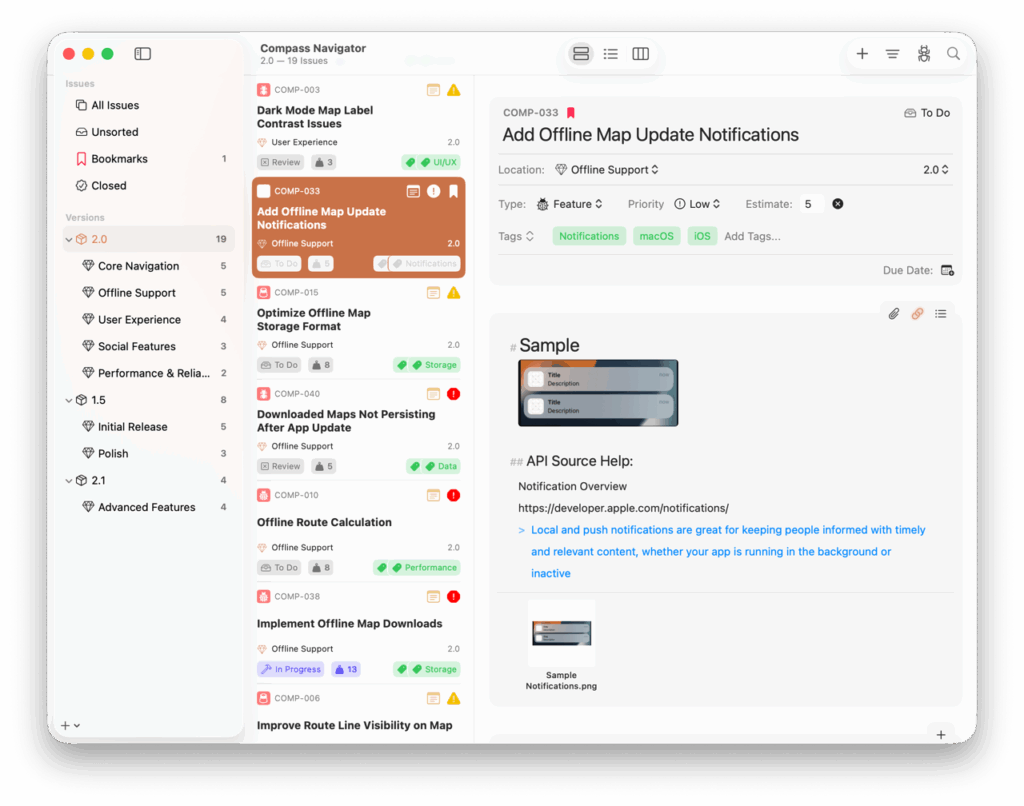
Fox 4.0 rebuilt the entire workspace around a new paradigm: every Version and Milestone is now its own independent view, switchable between List, Outline, and Board on the fly. The independent Board has been retired in favor of this unified, per-context approach — and a brand-new Outline view joins the lineup as a dense, spreadsheet-style way to work through issues.
View Modes
Every Version and Milestone now supports List, Outline, and Board view independently, and remembers its last-used mode across launches.

- A new unified toolbar layout across all modes and platforms.
- Replaced per-screen view controls with a centered, pinned view-mode picker in the toolbar (iOS + macOS)
- Added a matching “View As…” submenu under the View menu (iOS + macOS)
- Added keyboard shortcuts Control + Shift + 1, 2, or 3 to switch view modes (macOS + iOS)
- Consolidated filter controls into a single, mode-aware menu (iOS + macOS)
- List and Outline: Scope by Open/Closed + Sort By Property + Ascending/Descending
- Outline (on Versions): added Group by Milestone option
- Board: Show No-Status Column toggle + Resort Columns
- Added Modify Issue Menu — a new consolidated per-issue action menu covering Bookmark, Type, Priority, Add Attachment, Status, Close, Tags, and Move (iOS + macOS)
- Individual action toolbar items remain available via Customize Toolbar (macOS)
- On iPhone and compact split-view iPad: segment picker moves to the trailing navigation bar; Add, Filter, and Search move to the bottom toolbar’s trailing edge (iOS)
- Added a new search window, allowing search for access from any context (iOS)
A New Outline View
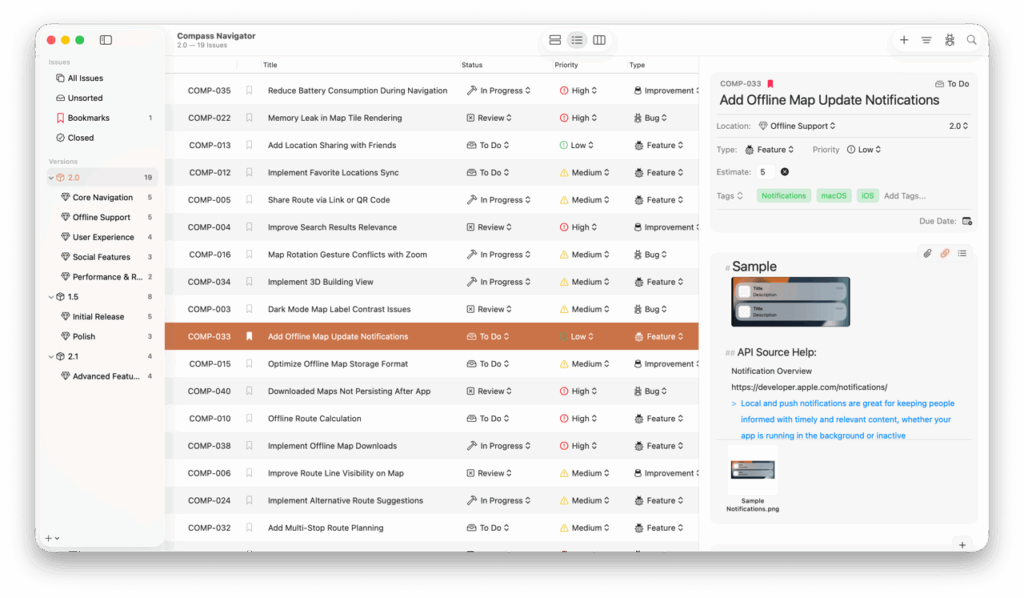
A new view mode available on every Version and Milestone — a dense, spreadsheet-style table of issues and their properties.
- Added resizable columns with widths persisted per layout (iOS + macOS)
- Added customizable column visibility via the Customize Columns sheet/menu (iOS + macOS)
- Available columns: Title, Status, Type, Priority, Milestone, Version, Assignee, Estimate, Resolution, Reference #, Bookmarked, Opened, Closed (iOS + macOS)
- Added inline editing for title, estimate, milestone, status, assignee, priority, type, and resolution directly in the row (iOS + macOS)
- Single-tap selects an issue; double-tap opens the issue detail (iOS + macOS)
- Added dedicated multi-select mode for bulk actions (iOS + macOS)
- Added section headers for grouped views, including milestone grouping (iOS + macOS)
- Full context menu, multi-select, and drag-and-drop support (iOS + macOS)
History Notes
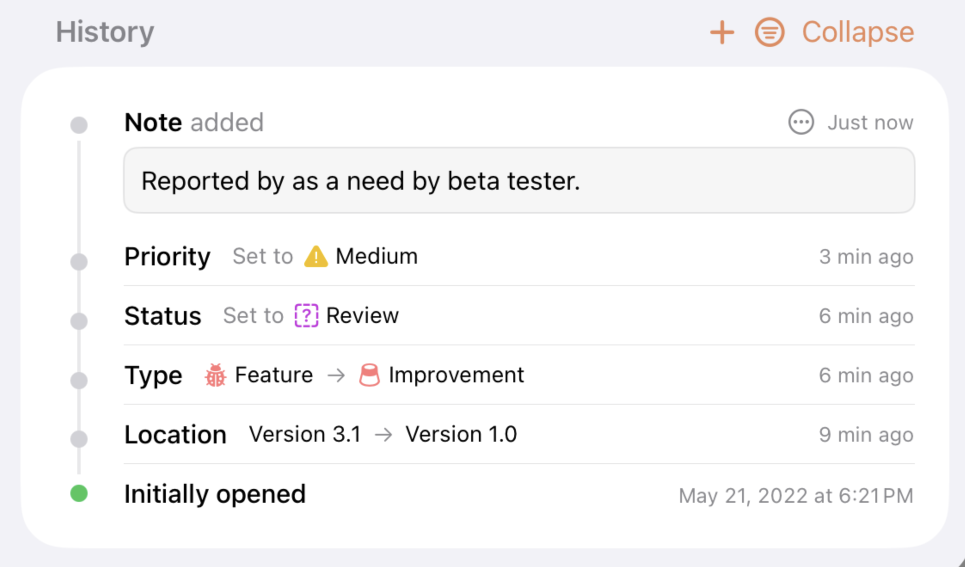
- Added the ability to attach text notes to an issue’s history timeline (iOS + macOS)
- Notes appear with a distinct callout bubble, visually separated from auto-recorded change events (iOS + macOS)
- Added editing and deletion support for notes (iOS + macOS)
- Added timeline filter: All / Changes (auto-recorded events only) / Notes (user-authored only) (iOS + macOS)
- Notes show attribution on shared projects — “Note added by [name]” (iOS + macOS)
Kanban Board Improvements
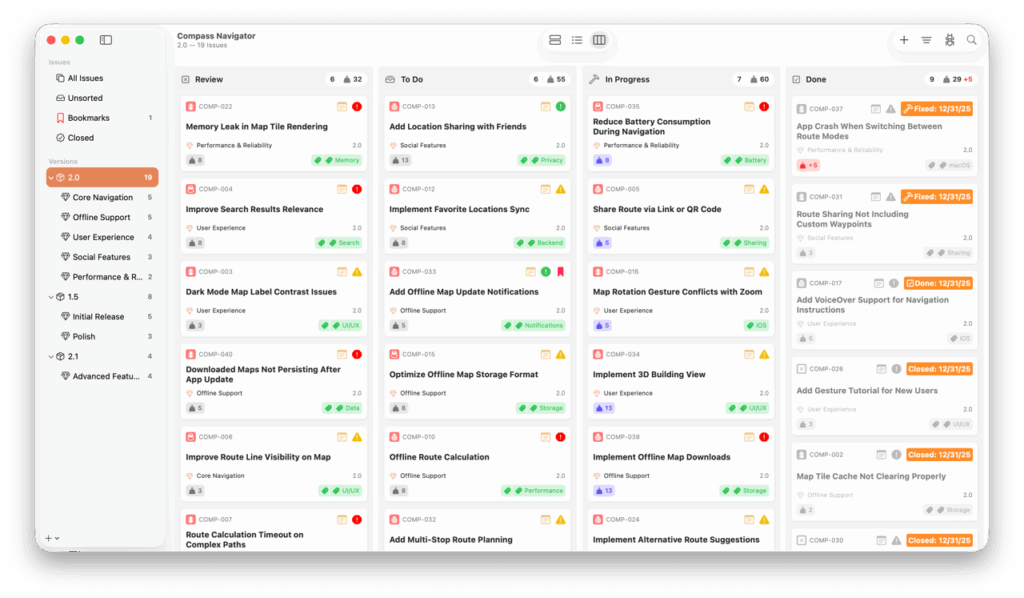
- Added single-selection support on iOS — tap to select an issue and populate the detail panel (iOS)
- Added system-integrated multi-select via two-finger drag or trackpad drag-select (iOS)
- Improved drag-and-drop system integration for more natural issue movement (iOS)
- Added the ability to drag issues to other destinations in the Navigator (iOS)
- Added context menus on long-press and right-click (iOS)
- Selected issues now respond to Issue menu actions and keyboard shortcuts (iOS)
- Added auto-resort for Board columns via the View Settings menu (iOS + macOS)
Navigator
- Added “Unsorted Milestones” sidebar section to group milestones not assigned to any Version — toggle via View → Group Unsorted Milestones or the sidebar context menu on the Versions header (iOS + macOS)
- Fixed several bugs around moving Versions within the sidebar root (iOS + macOS)
- Added a dismissable “What’s New” banner in the workspace on update, previewing the headline new features (iOS + macOS)
Issue Detail Column
- Outline and Board views now support toggling the detail column independently (iOS + macOS)
- Added View → Show/Hide Issue Detail Column menu item to toggle visibility (iOS + macOS)
- Added ⌘⇧D keyboard shortcut to toggle the detail column (macOS)
- Redesigned the Bookmark button appearance (iOS + macOS)
- Redesigned the reference number chip with additional copy actions (iOS + macOS)
- Added a unified “Copy…” submenu to issue context menus across all views (iOS + macOS)
- Copy Link to Issue — copies the fox:// deep link
- Copy Reference Number — copies the PROJECT-XXX reference
CSV Export
- Added CSV export for all issues in a project via the Project menu (iOS + macOS)
- Added CSV export for a specific Milestone or Version’s issues via the Navigator context menu (iOS + macOS)
Additional Improvements
- Updated the macOS design for Liquid Glass / Tahoe design
- Added sorting by Estimate and Date Added to Milestone/Version in List, Outline, and Board views (iOS + macOS)
- Refreshed the History Timeline with reduced visual weight and tighter spacing (iOS + macOS)
- Expanded the available icon set (iOS + macOS)
- Added a one-time notice for users with both a lifetime unlock and an active subscription, explaining they can cancel the subscription (iOS + macOS)
- Improved the auto-sizing of the Markdown Editor (iOS + macOS)
- Added “Getting Started with Fox” to the Help menu (iOS + macOS)
- Linked Help search to web documentation for quick topic lookup (iOS + macOS)