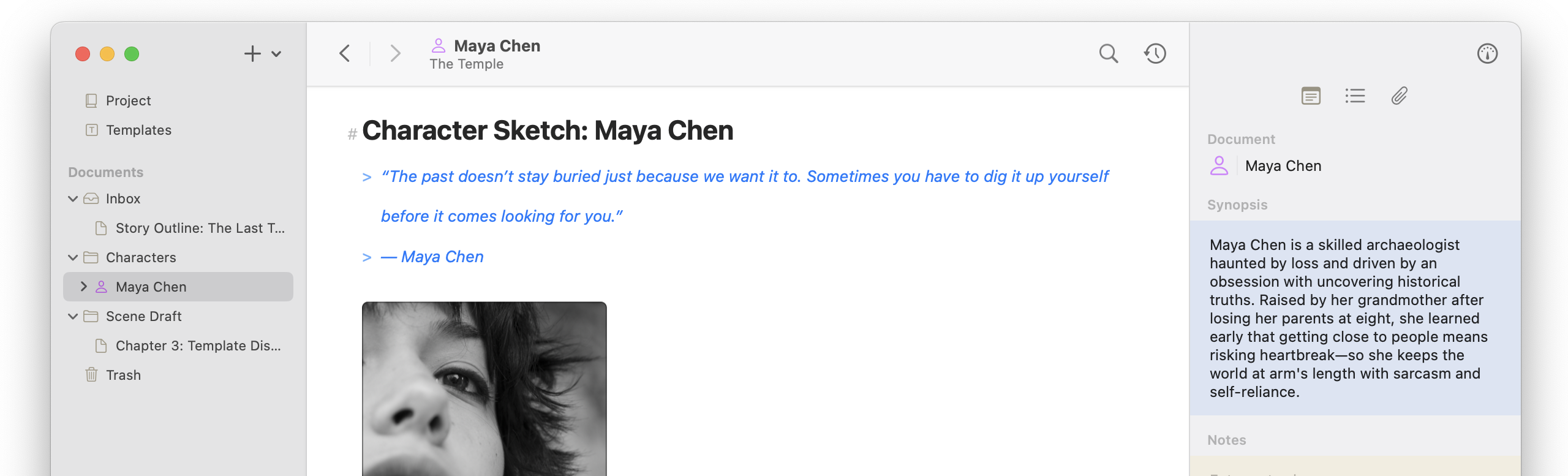
While on vacation I fell a bit behind in posting the release notes, so this is unified across a few different versions. First, templates have moved to the organizer so they can be easily viewed and dragged into text editors, canvases, and outlines. There is also an important update related to iCloud to fix a regression introduced in an earlier update that could cause stalling.
1.7.2
Templates Improvements
- Moved templates into the Organizer, listed under the Templates item (iOS + macOS)
- Added duplicate template option to the context menus in the Organizer (iOS + macOS)
- Added support for dragging templates into the documents section to create a new document, into folders to create a new document, into existing text documents to insert it, and a Canvas to create a new document and insert a document card (iOS + macOS)
- Expanded Focus Mode, Typewriter Scrolling, Appearance Override, and Text Size shortcuts to the template editor (iOS + macOS)
- Added an overview tab to the template editor’s inspector with detailed stats and outline view (iOS + macOS)
- Added templates to project export bundles and added import support (iOS + macOS)
Organizer Improvements
- Added Reveal in Organizer option for documents, accessible from the File menu or
Cmd+Shift+K, to navigate to the Organizer, scroll to the document, open its parents, and temporarily flash it (iOS + macOS) - Changed Open Document search shortcut for opening a new window to
Cmd+Return(iOS + macOS) - Added
Option+Returnshortcut to reveal documents in Open Document/Search in the Organizer (iOS + macOS) - Added visual indicators for opening in a new window and revealing in the Organizer to search results when command and option are held (iOS + macOS)
- Repositioned Recent Projects menu near Show Project Organizer in the Window menu (macOS)
- Added support for opening and copying web document URLs in the Organizer (iOS + macOS)
Other Improvements
- Improved iCloud sync by checking for updates when the app moves to the foreground (macOS)
- Added
Cmd+1keyboard shortcut for Fit to Contents in Canvas (macOS) - Updated image document previewer controls to use Liquid Glass (iOS + macOS)
- Added support for changing web document URLs in the Inspector (iOS + macOS)
- Redesigned document type selector when creating a document (iOS)
Bug Fixes
- Improved handling of escaped back brackets and fixed related escape character incorrectly rendering on export (iOS + macOS)
- Fixed issue preventing markdown syntax option from working in the Template Editor (iOS + macOS)
- Fixed issue preventing Canvas markdown editors from showing popovers for equations, footnotes, and annotations (iOS + macOS)
- Fixed issue preventing Canvas markdown editors from accepting drag-and-drop external media (iOS + macOS)
- Fixed potential crash when opening a previously open Canvas (iOS + macOS)
- Fixed cursor jump after pasting text (macOS)
- Fixed issue where the web viewer appeared under the Organizer and Inspector (macOS)
- Fixed issue where images in the Attachment viewer appeared under the Organizer and Inspector and acted oddly (iOS + macOS)
- Fixed issue where LaTeX equations rendered before fully loading (iOS + macOS)
- Fixed issue where LaTeX equations didn’t expand to their proper render bounds (iOS + macOS)
- Fixed issue where project image preview didn’t update in the Project Settings after changing (mac)
1.7.4
- Fixed issue where sync didn’t setup and start on launch properly, stalling all syncing (iOS + macOS)
- Fixed issue where document titles for internal links and resolved document variables displayed incorrectly (macOS)