Delivering on the most requested feature, Atlas 1.7 brings hidden markdown syntax! This can be toggled on and off in the editor menu. Along with that, a new search UI, a refreshed macUI, and editor improvements across the board.
Hidden Markdown Syntax
- By default, Markdown characters are hidden (iOS + Mac)
- Added option to show or hide Markdown syntax in the Editor, with a toggle in the editor menu (iOS + macOS)
- Tapping inside a Markdown formatting span (like bold) now reveals its characters for easy editing (iOS + macOS)
Liquid Glass on macOS
- Redesigned the macOS UI to adopt Liquid Glass and cleans up several UI pieces (macOS)
- Rearranged default toolbar items (macOS)
- Fixes the Forward/Backwards functionality (macOS)
- Added Forward and Back navigation, including toolbar arrows, workspace arrows, and File menu items (macOS)
Refreshed Search UI
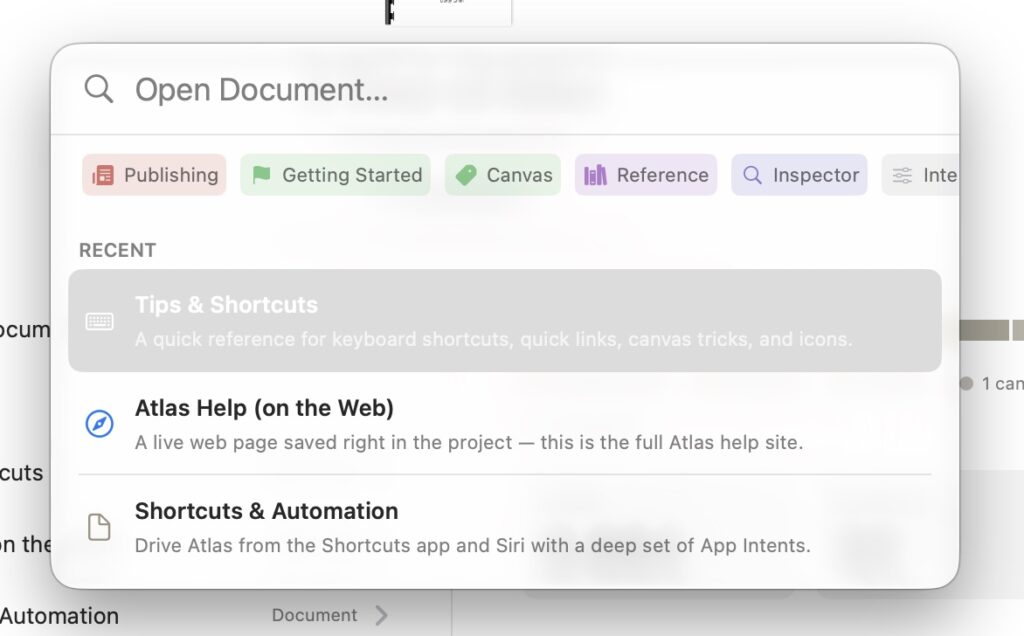
- Added integrated search and quick-open UI (iOS + macOS)
- Added Cmd+O shortcut to open quick open/search (iOS + macOS)
- Integrated the new search UI into Add Canvas Item, with support for tags, metadata, and a consistent UI (iOS + macOS)
- Added shift-click/shift-enter on a document in search to open it in a new window (iOS + macOS)
- Added support for opening pre-filled search from tags in the Inspector (iOS + macOS)
- Fixed issue where search didn’t open when a tag was tapped on the project overview (iOS)
Markdown Editor Improvements
- Added the ability to change editor maximum width (iOS + macOS)
- Improved edge inset behavior across window sizes (iOS + macOS)
- Improved text selection highlighting alignment (iOS + macOS)
- Added the option to manually adjust the editor’s max width (iOS + macOS)
- Expands block level backgrounds to the full editor width (iOS + macOS)
- Improved and aligned code block and equation block backgrounds (iOS + macOS)
- Fixed issue where individual font overrides remained active after being disabled (iOS + macOS)
- Improved Find and Replace to work with visible and hidden Markdown syntax (iOS + macOS)
- Added Find and Replace support in table cells, with results highlighted (iOS + macOS)
- Improved search querying to match system behavior (iOS + macOS)
- Fixed issue where searching an active document didn’t include the most recent text (iOS + macOS)
- Fixed an issue that caused graphical artifacts during autocompletion (iOS)
- Improved the pasting of Markdown content (iOS + macOS)
Export Improvements
- Added native PDF table support to export (iOS + macOS)
- Fixed issue where Markdown characters rendered in PDF tables alongside styling (iOS + macOS)
- Fixed issue where annotations and footnotes inside tables weren’t preserved on export (iOS + macOS)
- Fixed extra spacing around links in exported PDFs (iOS + macOS)
Canvas Improvements
- Updated default Canvas icon (iOS + macOS)
- Fixed issue where deselecting a canvas item by clicking the background left Editor menu items disabled (macOS)
Other Improvements
- Reorganized the File menus on iOS to match macOS (iOS)
- Added Create from Template option to the Sidebar (macOS)
- Fixed issue where tables misaligned relative to content when typewriter scrolling was toggled (macOS)
- Fixed issue where text was misplaced after disabling typewriter scrolling at the top of a document (macOS)
- Fixes an issue that could cause replacing an existing Sample Project to stall iCloud sync (iOS + macOS)