
Fox 3.0.0 represents a huge leap for the app—we are now called Fox Project Organizer instead of Issue Tracker as we expand our horizons.
Important: There is a major data migration with 3.0.0 and above so it will be impossible to move back after migration completes. This occurs on application launch. This will also cause a full re-sync to your iCloud storage if enabled.
What’s New
- Project-Isolated Attributes — Different projects can now have different properties for their issues, including Issue Types, Statuses, Priorities, Resolutions, Tags, and Link Types. Existing projects migrate automatically.
- Redesigned Project Settings — Easily get an overview of your Project’s statistics and customize its properties.
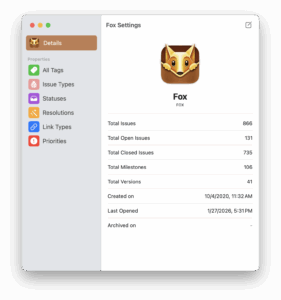
- Customizable Priorities — Priorities are now fully customizable and isolated per project, just like other attributes.
- Updated Shortcuts & CSV Import — Both now support project-isolated attributes, including open-ended priorities by name.
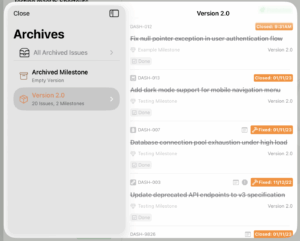
- Project Archives on iOS — Archive completed versions and milestones on iPhone and iPad.
- Navigator Customization — Add any Status or Priority from the project to the Navigator for quick access.
- Synced Settings — General settings, issue group defaults, milestone/version sort defaults, and Navigator configurations now sync across devices via iCloud.
- Independent Issue Windows on iPadOS — Issues opened outside the Workspace now appear in their own movable windows.
- Improved Issue History — Detailed tracking for property changes and assignments.
- Fox for Teams — New collaborative features including issue assignments, project sharing, and history attribution to track who made changes.
- Expanded Help Documentation — More comprehensive guides and materials.
- Free Trial Support for those wanting to give Fox Project Organizer a spin.
- Expanded Icon Set — Additional icons to choose from.
- Customizable Line Height — Reduced default line height with an option to adjust in General Settings.
- Free Trial of 14 days for users who want to give it a quick go
- Improved iCloud conflict resolution to better ensure data is merged in obvious conflict scenarios, and when merging, considers date of last edit per property.
- Under-the-hood improvements to performance and overall functionality.
Bug Fixes
- Aligned the Status menu appearance across both platforms.
- Fixed Help contents not displaying dark mode correctly on macOS.
- Fixed Help opening to the first page on iOS and the Close button occasionally being unresponsive.
- Fixed iCloud sync showing an erroneous error when the network was unavailable.
- Improved long project title visibility in the iOS Navigator.
- Improved drag and drop behavior when moving items within the iOS Navigator.
- Fixed an issue where the macOS issue detail view had extra height without corresponding content.
- Various other minor fixes and improvements.
Fox for Teams
Fox for Teams is a subscription add on-service that enables the creation of collaborative workspaces and allows joining of existing Collaborative Services. Besides just collaboration, projects get:
- Access to additional tools like history attributions and issue assignment
- Access detailed history and tracking reports to oversee project trajectory
- Additional upcoming team management features.
Fox 3.0.1 Patch Release
After Fox 3.0.0 releases, it will be followed by a patch release which includes:
Search Improvements
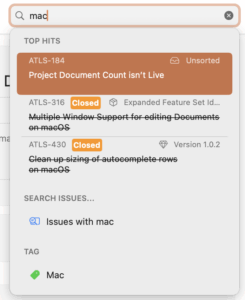
- macOS search now has feature parity with iOS, including token-based search and proper ranking support.
- Added support for searching by Status (Mac + iOS)
Bug Fixes and Improvements
- The command bar now toggles visibility when dragging issues (Mac + iOS)
- Added a plus button to the Navigator (macOS)
- Active bookmark is now highlighted (macOS)
- Redesigned the toolbar when creating an issue (iOS)
- Fixed an issue that could cause a loop with iCloud syncing (Mac + iOS)
- Added regional support to date outputs (Mac + iOS)
- Fixed image insertion at the end of a document body (Mac + iOS)
- Fixed a potential issue where the text editing menu could appear over the link editor popover (iOS)
- Fixed keyboard overlapping the bottom of the search issue view (iOS)
- Fixed color inconsistencies across several UIs (Mac + iOS)