Versions & Milestones
Versions and milestones are optional tools for grouping issues into manageable scopes. They exist so projects can grow from a handful of issues into a structured plan without forcing you to commit to that structure on day one. Start flat, add organization when it helps.
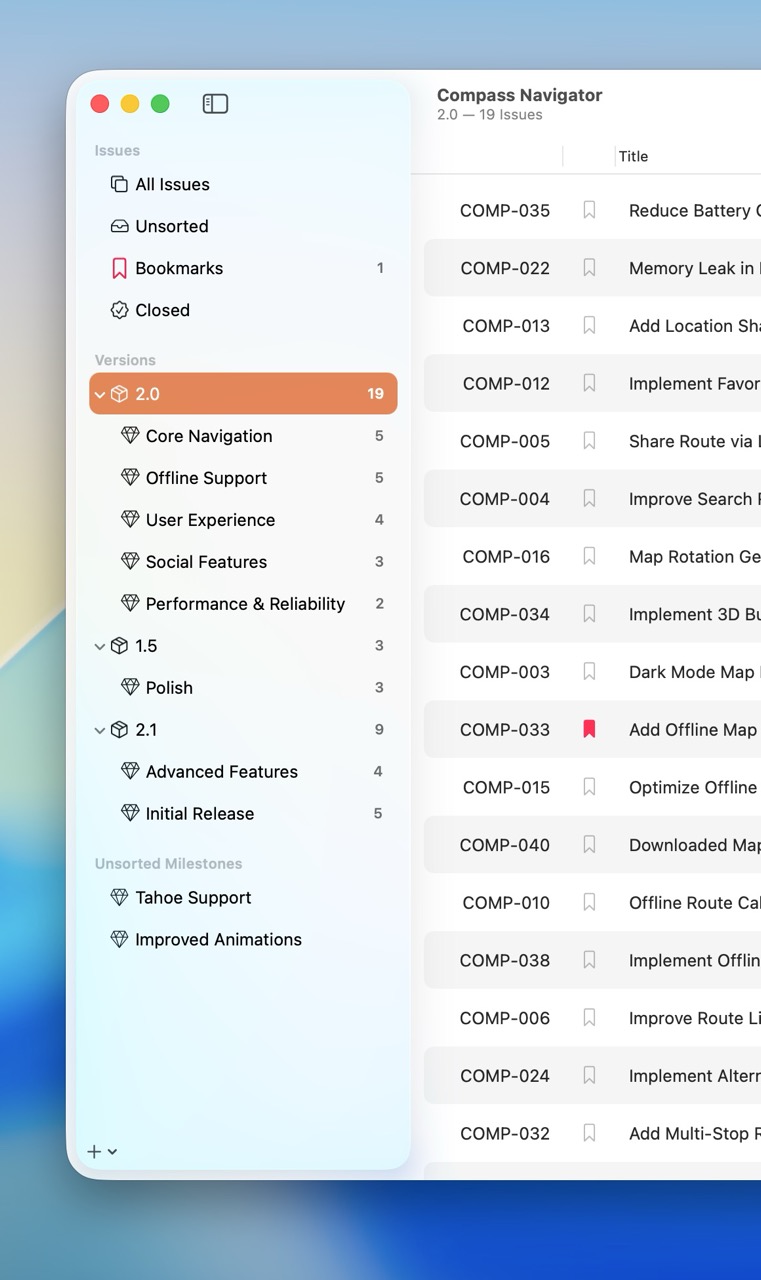
Versions and Milestones in the Navigator
Versions
Versions typically represent major releases or deliverables — something shippable, or at least something you'd cut a branch for. Examples:
v1.0Summer ReleaseQ1 2026MVP Launch
A version can contain milestones as children, which makes it a natural fit for large scopes that need to be broken down further.
Milestones
Milestones typically represent specific goals or features within a version — or on their own, outside any version. Examples:
User AuthenticationDark Mode SupportOnboarding FlowPerformance Improvements
Milestones are flexible groupings for related issues. Each one displays its progress as a count of open vs. closed issues, so you can see how close it is to "done" at a glance.
The Hierarchy
Fox's hierarchy is shallow on purpose:
Project
├── Version
│   ├── Milestone
│   │   └── Issue
│   └── Milestone
│       └── Issue
└── Milestone (outside any version)
    └── Issue
- A project contains versions and milestones at the top level.
- A version can contain milestones as children.
- Issues live inside a version, inside a milestone, or in neither (see Unsorted below).
Both versions and milestones are entirely optional. You never need either one — you can run a project with nothing but a flat list of issues. Add structure only when it starts earning its keep.
The Unsorted Category
Issues that aren't assigned to any version or milestone automatically appear in Unsorted — a permanent Navigator group that acts as your backlog. Use it for:
- Capturing new ideas without immediately committing them
- Reviewing and prioritizing before planning
- Keeping potential work visible without cluttering active versions or milestones
When you're ready to schedule an Unsorted issue, drag or move it into a version or milestone.
Grouping Unsorted Milestones
Milestones that aren't assigned to any Version can be grouped together under a dedicated Unsorted Milestones sidebar section, rather than mixing with your top-level Versions. Toggle this behavior via:
- View → Group Unsorted Milestones in the menu bar, or
- The sidebar context menu on the Versions header.
Useful when a project has both version-organized milestones and a handful of standalone ones — the grouping keeps the Navigator tidy without forcing you to assign every milestone to a Version.
Creating & Managing
Create versions and milestones from the Navigator. When you create one, it's added either at the top or the bottom of the list depending on your project's Group Creation Position setting.
Once created, you can:
- Reorder — Drag and drop in the Navigator.
- Color-label — Assign a color for visual distinction.
- Move issues in and out — From the Issue Browser or by dragging.
- Open in any view — Select a version or milestone in the Navigator and switch between List, Outline, and Board to look at its issues however suits the task. See Viewing Issues.
- Archive — Move completed versions and milestones (and their issues) out of the active workspace. See Archives.
When to Use Versions vs. Milestones
The distinction is loose on purpose. A rough heuristic:
- Versions answer: what's shipping together?
- Milestones answer: what work is this for?
If you're tracking a product release, you might have a single v2.0 version with milestones inside it for the major features. If you're tracking ongoing work with no clear release boundary, you might skip versions entirely and just use milestones for each initiative. There's a guide on this with more concrete examples: Versions vs. Milestones.
See Also
- The Navigator — Where the version/milestone hierarchy lives
- Viewing Issues — Opening a version or milestone as a List, Outline, or Board
- Archives — What happens when you finish a version or milestone
- Versions vs. Milestones — A deeper guide with worked examples
- Setting Up a Project — Planning your structure from scratch