Shortcuts Automation
Fox integrates with the Shortcuts app on Mac and iOS, letting you automate issue workflows without opening Fox. Create issues from a lock-screen button, batch-update statuses after a sprint review, wire Fox into a Safari extension — anything you can do through Shortcuts can now touch Fox.
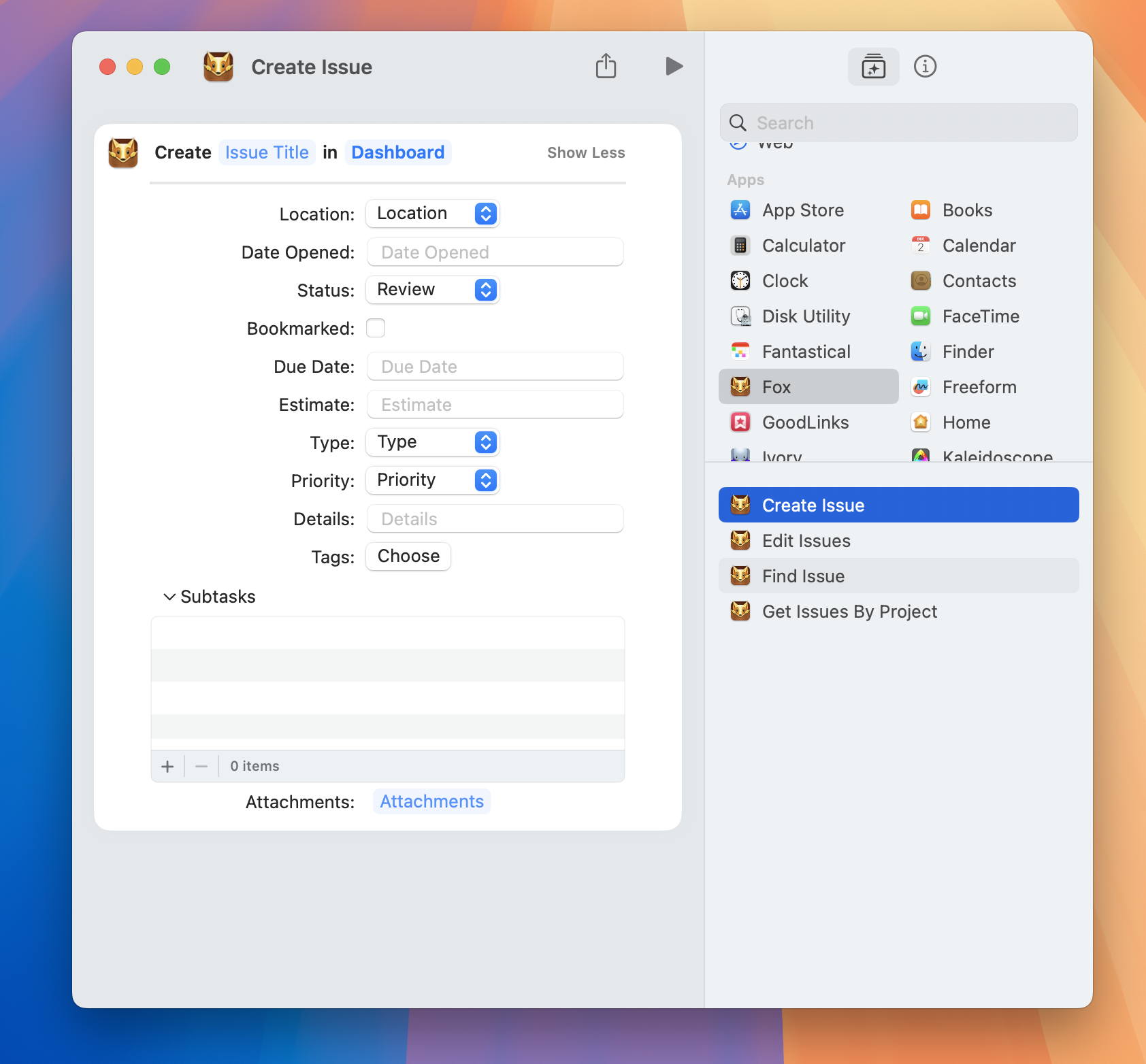
Fox Shortcuts on macOS
Available Actions
Fox exposes Shortcuts actions in two categories — one for Issues and one for Locations (versions and milestones). Every project-specific attribute — status, priority, type, tags, resolution — is picked from the target project's own set when you build the shortcut, so you never have to hard-code names.
Issues
Create Issue
Create a new issue in a project. The title and project are required; everything else is optional:
- Title (required)
- Project (required)
- Location — A version or milestone in the project
- Status
- Priority
- Type
- Tags (multiple)
- Subtasks (multiple)
- Due date
- Date opened
- Estimate
- Bookmarked
- Details — The issue notes
- Attachments — One or more files
This is the workhorse action — most Shortcuts that interact with Fox use it.
Get Issues By Project
Retrieve a list of issues from a project. Filter by:
- Project (required)
- Location — A specific version or milestone
- Open scope — Open only, closed only, or all
- Sort order — Date opened, title, priority, and more
- Ascending / descending
Use Get Issues By Project to pull a batch of issues into a shortcut that then processes them — for example, a weekly report that fetches every issue closed in the last seven days.
Edit Issues
Batch-edit a single property on one or more issues. Pair it with Get Issues By Project to fetch a set, then apply a change across all of them. Editable properties include:
- Title, details, resolution details
- Location (move to another version or milestone)
- Status, type, priority, resolution
- Tags
- Subtasks
- Attachments
- Due date, date opened, date closed
- Estimate
- Bookmarked
- Close and reopen
Edit operations support a modification type — set, append, prepend, add, remove, or remove all — so you can, for example, add a tag across a batch of issues without removing their existing tags.
Locations (Versions & Milestones)
Shortcuts can also manage a project's version and milestone hierarchy directly, not just the issues inside them.
Create Location
Create a new version or milestone in a project:
- Name (required)
- Project (required)
- Location type (required) — Version or Milestone
- Parent version — Optional. Nest a new milestone inside a version.
Get Locations
Retrieve a list of a project's versions and milestones:
- Project (required)
- Location type — Filter to just versions or just milestones
- Include archived — Off by default
Move Issues to Location
Assign a batch of issues to a version or milestone. Pairs naturally with Get Issues By Project:
- Issues (required) — From a previous action
- Project (required)
- Target location (required)
Edit Locations
Update a property on one or more versions or milestones:
- Locations (required) — From a previous action
- Property (required) — Name, archived, or parent
- Updated name, updated archived, or updated parent
Example Workflows
Quick-Capture Bug Report
A one-tap shortcut that prompts for a title and creates a high-priority Bug issue in your main project. Put it on the iOS Lock Screen and you can file a bug in two taps.
Steps:
1. Ask for Input — "Bug description?"
2. Create Issue — Project: FOX, Title: the input, Type: Bug, Priority: High
Safari → Fox
Build a Shortcuts action that runs from the Safari share sheet, captures the current URL and page title, and creates an issue with the URL in the notes field. One-click issue creation from any webpage.
Weekly Close-Out Report
A scheduled shortcut that runs every Friday afternoon:
Get Issues— closed in the last 7 daysRepeat With Each— format each issue as a markdown bulletSend Message— post the list to a team chat
Batch Reschedule
After a sprint review, move every issue in a milestone that wasn't completed to the next milestone:
Get Issues— location:v2.0, open onlyEdit Issues— location:v2.1
Where to Place Shortcuts
On iOS:
- Home Screen — Add a Fox shortcut as an icon for one-tap access
- Lock Screen — Include a shortcut in the Lock Screen widget for instant capture
- Widgets — Multi-shortcut widgets for grouped actions
- Share Sheet — Share from Safari, Notes, Messages, or any other app into a Fox-aware shortcut
On Mac:
- Menu Bar — Pin shortcuts to the menu bar
- Dock — Add a shortcut to the Dock as an app
- Keyboard shortcuts — Bind any Shortcut to a global keyboard shortcut
Tips
- Use a default project variable — Store your main project ID in a Shortcut variable so you don't have to pick it every time.
- Combine with other actions — Shortcuts' real power is connecting Fox to other apps. Calendar events → issues, text detection → issues, GPT prompt → issues.
- Test with throwaway issues first — Batch
Edit Issuesactions affect everything they match. Verify your filter before running against a real project.
See Also
- URL Scheme — A lower-level alternative to Shortcuts for deep linking
- CSV Import & Export — Better choice for bulk one-time imports than Shortcuts
- MCP Server — The AI-native alternative for more complex automation
- Issues — What the actions above create and edit