Writing with Markdown
This is the full formatting reference for Atlas's markdown — every syntax element, what it renders as, and its keyboard shortcut where one exists. For an overview of the editor itself (the live-rendering surface, making it comfortable to write in, formatting controls, find and replace, and copy/paste conversion), see The Editor.
Formatting Reference
Atlas supports the following markdown syntax. Where available, keyboard shortcuts are listed for Mac and iPad with an external keyboard.
Headings
Use # symbols to create headings. Additional # symbols mean deeper levels.
| Syntax | Result | Shortcut |
|---|---|---|
# Heading |
Heading 1 | Cmd+Shift+1 |
## Heading |
Heading 2 | Cmd+Shift+2 |
### Heading |
Heading 3 | Cmd+Shift+3 |
#### Heading |
Heading 4 | Cmd+Shift+4 |
##### Heading |
Heading 5 | Cmd+Shift+5 |
###### Heading |
Heading 6 | Cmd+Shift+6 |
Headings also appear in the Document Outline in the Inspector, giving you a clickable table of contents for long documents. See The Inspector for details.
Inline Formatting
| Syntax | Result | Shortcut |
|---|---|---|
**text** |
Bold | Cmd+B |
*text* |
Italic | Cmd+I |
~~text~~ |
Cmd+U | |
::text:: |
Highlighted text | Cmd+Shift+H |
`code` |
Inline code | Markup menu |
Block Elements
Blockquotes — Prefix lines with > to create a blockquote. You can quote multiple lines together, too, and pressing Return continues the > marker onto the next line automatically. Blockquotes can also be indented — see Indenting Paragraphs and Blockquotes for the full mechanics.
> This is a blockquote
> that spans multiple lines
Shortcut: Cmd+D
Ordered lists — Start lines with a number and period or parenthesis:
1. First item
2) Second item
3. Third item
Unordered lists — Start lines with a dash, star, or plus:
- First item
* Second item
+ Third item
Use Cmd+] to indent list items and Cmd+[ to de-indent.
Code blocks — Wrap multiple lines in triple backticks:
```
Your code here
```
Horizontal rules — Type three dashes on their own line to insert a visual divider:
---
Tables — Create a grid of rows and columns for structured data, comparisons, or reference lists. Tables follow GitHub Flavored Markdown syntax and support full inline formatting inside each cell.
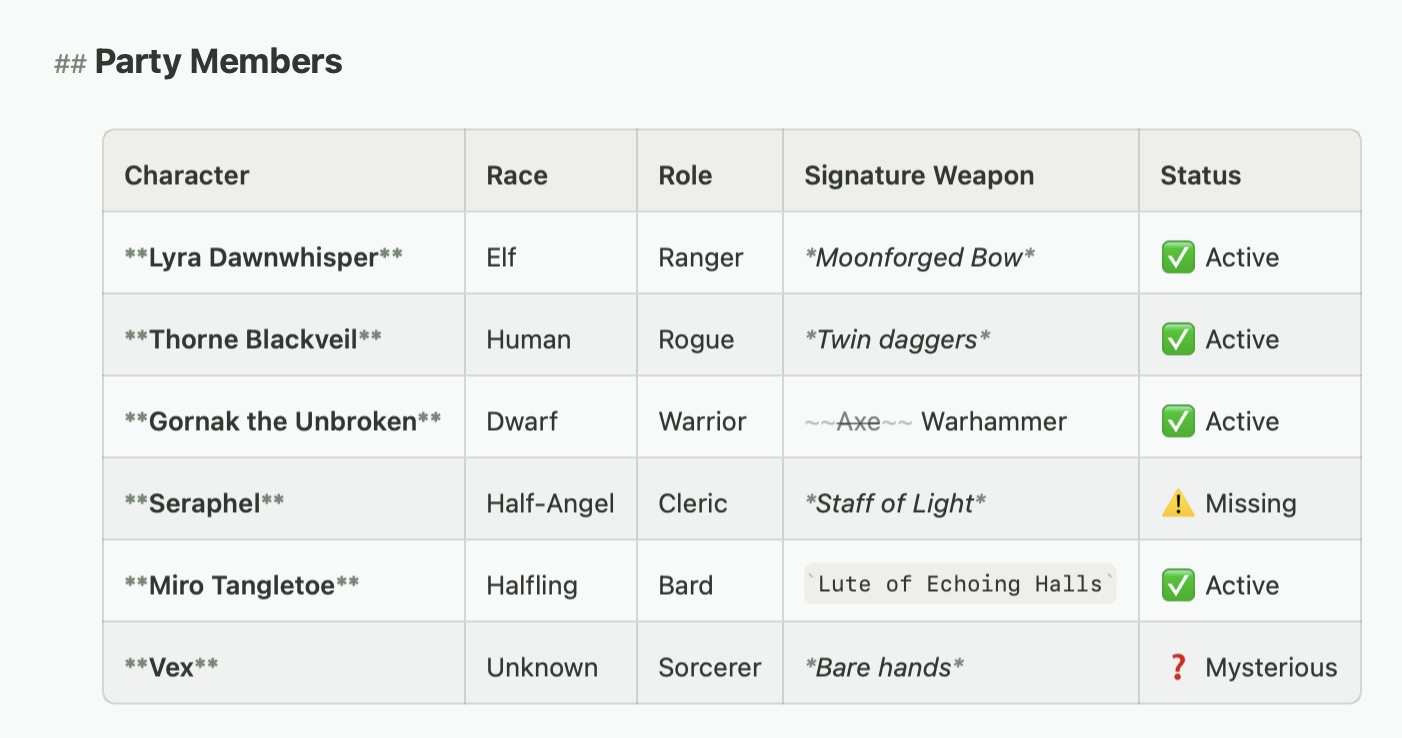
A sample of a table in Atlas
For insertion, editing, row and column management, pasting from spreadsheets, and export options, see the Tables guide.
Beyond Text
Atlas also supports images, links to other documents, annotations and footnotes, equations for embedding LaTeX math expressions inline or as blocks, and Document Variables (type {{) for placeholders like title and dates that fill in automatically — each covered in their own articles.
See Also
- The Editor — The live-rendering editor, making it comfortable to write in, and formatting controls
- Tables — Adding structured tables to your documents
- Math Equations — Embedding LaTeX math expressions
- Document Variables — Placeholders like title, author, and dates that fill in automatically
- The Theme Editor — Creating and customizing editor themes
- Keyboard Shortcuts — Find, editing, and navigation shortcuts